DbClix

Download

Download

PES 2012

PES 2012

Windows 7

Windows 7

Sony Acro S

Sony Acro S
Showing posts with label i780Winmob. Show all posts

Flash i780 under Windows7

well, now with windows7 u can flash ur i780 :)
*im using win7 ultimate 32BIT

Files need to download:
-Samsung modem driver vista
-WinXP_x32.zip or Mirror (extract somewhere, eg, D:)

Step:
-make sure u have done extract winXPx32 above
-attach i780 to pc (wait for install drivers)
-now windows mobile center will show up, now CLOSE windows mobile center
-turn off i780
-turn on i780 in emergency mode (Alt + Enter + power)
-go to device manager
-Locate "Mobile Device" group, open, locate "Samsung MITs USB Sync"
-Right click on it, Properties, "Update Driver Software"
-Choose "Browse my computer for driver software", "Let me pick from a list of device drivers on my computer"
-Click on "Have a disk", "Browse", find folder with extracted attached driver, choose "wceusbsh", Click "Ok"
-CLick on "Samsung MITs USB Sync", click on "Next", wait for driver to install, click on "Close"

now u can flash ur i780 with standart procedure....

Special thanks to: xda-developers + Kaskus

NEW PDXIB1 Official ROM

A new ROM PDXIB1 is out! Please check out!

This is the link for downloading it (Upgrader untuk XP) : Download

This is the link for downloading it (Upgrader untuk Vista) : Download

Manila 2d i780

MANILA2d

Download Manila2d square khusus ijbo
Download


Manila2d setting Comm:
Install Opal Comm Manager 2.7.1.8 with a Manila2D skin
Only Grey and Blue : Indowebster


Lalu, ubah sedikit registrynya biar, wifi nya bisa ON/Off
1) "HKLM\Software\Drivers\WLAN" ,copy nilai 'AdapterName" string.
2) Lalu, "HKLM\Software\HTC\CommManager\WLAN" , Edit "DeviceName" string. hasilnya: "{98C5250D-C29A-4985-AE5F-AFE5367E5006}\TNETW12511". ubah bagian terakhir aja (as in TNETW12511) dengan nilai "AdapterName" yg telah anda copy di langkah 1.
3) Softreset
dah bisa on/off

Update i780 WinMob 6.1 HL2 Official

Check ur firmware (START-SETTINGS-SYSTEM-VERSION)
is it HD1?
Newest is HL2, with WinMob 6.1


For XP ONLY:
Caution:
  • Upgrading will erase all the stored data on the device. It is recommended to backup necessary data before starting the upgrade.
  • Make sure nothing disrupts the upgrade process.
    (You must not turn off your PC or the device, remove the USB cable or close PC applications during upgrade.)
  • Device must have enough battery to sustain until the upgrade is complete.
How to Install:
-Download upgradeForXP
1.Install ActiveSync4.5 DOWNLOAD
2.Install Samsung Modem Driver Download

3.Samsung Mobile Modem Driver should appear under ‘Add or Remove Programs’ menu under ‘Control Panel’.


4.Connect to ActiveSync and backup necessary data
Connect your device to the PC with the USB data cable.
(It is strongly recommended to connect directly to the PC USB port rather than a USB hub.)

If connection fails, please try again after closing all PC firewalls or Anti-Virus programs. Please keep ActiveSync active after completing data backup. ActiveSync must remain active throughout the entire process.


5.Upgrade
Caution
- During the upgrade, all the data stored on the device will be lost. Please check that all necessary data had been backed up.
- The upgrade process must not be interrupted. Closing all
unnecessary programs running on the PC is recommended.
- Download the desired program version.
- Execute the downloaded program.

- Select language
- A dialog box, as shown on the left, will be displayed.


Complete and tick off critical tasks listed.


A dialog box as shown above will be displayed when the device is identified. Clicking the OK button will reset the device, and the update installation will start automatically. items, click on ‘Verify device’.


Download is in progress. Please wait until the download is complete.


If you see this message, please check if SAMSUNG driver is properly installed under Control Panel. If so, please try upgrade again.


Download is complete and the device will be reset. You may remove the USB cable and close the application.

Appz for i780

Bejeweled2 atau Keygen
Game

beejive
buat Chat jg

Core Player 1.30
Buat liat Video + youtube

HTC X-Button 1,5
Aplikasi buat close program tanpa harus masuk task manager

Net Compact Framework 3.5
update buat windows mobile biar program2 yg butuh NETCF3.5 bisa jalan dengan mulus

psShutXP
(Program buat Soft Reset, Hard Reset, Shutdown PPC anda)

Resco Contact Manager
(Organize your contact)

Resco Utility
(Lengkap, Explore, keyboard, Registry, FTP)

Slick
Buat Chat jg

Sms tweaker
bisa set sms threated / conversation mode

Spb.Weather.2.1.0.Build.1492
(biar tahu cuaca)

Sprite Backup 6.5
program yang bagus banget nih buat backup pda kita... fitur komplit dan stabil

Vsnap
Buat Screenshoot

dan masih diupload lagi, sabar ya :D

@Progie (share)

Samsung i780 + Spb Mobile Shell + Skins

Ingin membuat tampilan i780 anda lebih menarik?
menu lebih interaktif, pakai SPB mobile shell.

Tools (download dulu ya):
4Shared (Spb Mobile Shell v2.1.2 b3534+Skins)
Indowebster : Spb Mobile Shell v2.1.2 b3534 + Skins

kalo udah download:
1. Extract dulu di pc anda
2. Copy hasil nya, (SpbMobileShell2.arm.cab + folder SpbMobileShellSkins) ke MicroSd anda
3. Install SpbMobileShell2.arm.cab
4. mau install skinnya? buka folder SpbMobileShellSkins, masuk folder scripts, jalankan MortScript.exe , muncul pemberitahuan, klik OK,
5. masih di folder scripts, jalankan Install_SQ320.mscr
6. Kemudian pilih Language
7. Install All themes? pilih OK
8. Installation done, klik OK, udah selesai tuh , saatnya setting layoutnya
9. Customize Layout? YES
10. Single clock? terserah anda
11. Use low memory layout? YES
12. udah tinggal sesuai keinginan anda.
13. kalo udah, RESTART i780 nya

dan jadinya?

Xperia + Diamond + Omnia


Install Real VGA

What is RealVGA?
This is the new Real VGA release.
With Real VGA you can change the DPI setting and the language of any WM6 base deivce. Install the desired packages and the Real VGA package.
Later on I will release some device specific Add-On to support the programs added by HTC for example.

If you get a warning about missing DLLs report them in the next message in this thread. Please edit this thread instead of posting your own list because otherwise it will be very hard to track.

The DPI packs are available for 96dpi and 128dpi. The new HTC Home plug-in seems to run pretty well in 96dpi :-)
The Language packs are available in the next post. If you need any additional language feel free to request them.

Important! Please note that currently they are designed only for ENGLISH OS versions. The may behave unpredictibly under other OS.

- Version 1.1

I just released a new version. If there are some dlls missing for you desired langauge than it tries to make a copy the dlls in your device for the new language. As a result some programs may show up in English but I think this is much better than not working at all. I will prepare additional packs to support all the device specific applications as well but in the meanwhile you will have them at lease in English

If you have used version 1.0 already then please switch once to English and then back to your desired language.
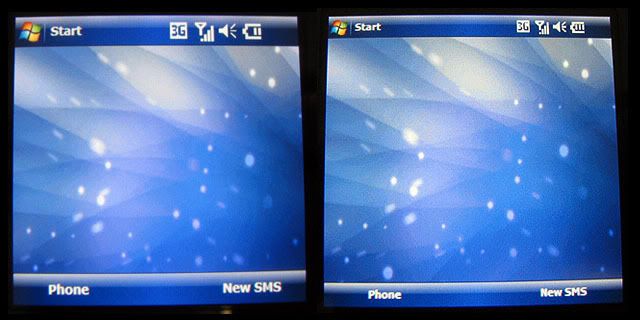
I have included in both DPI packs a fix to close the gap at the bottom of the phone

Result : Before and After
RealVGA 96dpi working on EPIX
***UPDATE 12.03.08 NEW RESPACK INCLUDES POUTLOOK (threaded sms) ICONS***

I made a few adjustments to the 96 dpi resource cab for RealVGA so it can now work with the Epix. No more cprog.exe crashes and the Phone and Contacts work properly.

Still a little rough, as there are no icons for Domain Enroll and Task Manager, and the messaging icons in the inbox are slightly off...but overall it works great and lets you get the full effect of a 320x320 screen.

RealVGA along with HTCHome and HTC X-Button 1.5 make the device a lot more usable IMHO.

To get realVGA running on your EPIX:
1. Install respack96.cab on device (followed by reset)
2. Install RealVGA_11.cab
3. Start -> Programs -> RealVGA
4. Select 96dpi and UNTICK "Disable phone skin", OK (phone will reset)

After reset, I find it best to set the Today theme to Windows Default and set the screen font size to the middle setting.

Please note that I perform the above steps on a fresh phone i.e. following a hard reset...not sure it's necessary but I figure good to get 96dpi going when the phone is clean.

DOWNLOAD Real VGA:
Indowesbter (1paket)
Forum XDA : file RealVGA_11.cab dan respack96outlookfix.cab